

You can make a portfolio website with Notion by creating a homepage, adding one subpage per project, selecting Share and then Publish, and enabling Discoverable on the web if you want search engines to find it. The free route uses a notion.site address. Paid plans add site customization and Google Analytics; a custom domain requires a separate Notion add-on.
This guide walks through the actual setup, where Notion holds up and where it doesn't, how it compares to a tool built specifically for portfolios, and the signs that mean it's time to move somewhere else.
The setup, step by step
- Create one parent page as your homepage, with a short intro and a list of project pages linked below it.
- Give each project its own sub-page: the work, the process, the outcome. Keep the structure consistent across projects so a returning visitor knows where to look.
- Add a simple table or gallery view on the homepage linking to each project page, rather than a long unstructured list.
- Open Share, choose the Publish tab and publish the homepage. Check every linked project separately so a private subpage does not become a dead end for visitors.
- Open Search engine indexing and enable "Discoverable on the web" if you want the site to appear in search. Notion notes that indexing can take up to four weeks.
- Optional: on a paid workspace, purchase Notion's custom-domain add-on and connect a subdomain you own through DNS. Notion currently lists the add-on separately from the workspace plan.
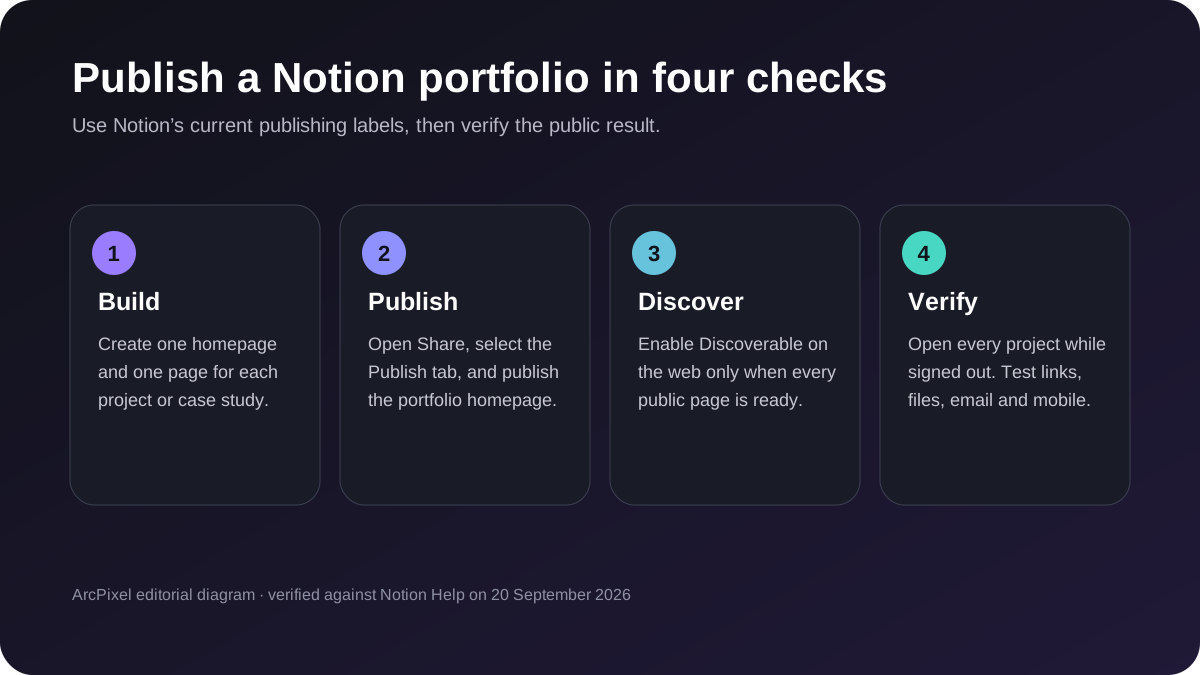
For screenshots of Notion's current publishing controls, use Notion's illustrated publishing guide. Its screenshots show the live product interface; the diagram above is an ArcPixel illustration of the steps.
Where Notion actually falls short
Notion is strongest when speed and familiar editing matter more than art direction. The free route retains Notion branding and a notion.site address. Paid plans provide more site controls, Google Analytics and the option to buy a native custom-domain add-on, but the layout still follows Notion's page and block system rather than a portfolio-specific case-study structure.
- A native custom domain is available only on a paid workspace with a separate domain add-on; Notion currently requires a subdomain such as www or portfolio.
- The Built with Notion watermark can only be disabled when the site uses a custom domain. Review the Duplicate as template setting separately before publishing.
- Layout is limited to Notion's own blocks — there's no way to art-direct spacing, typography, or a hero section the way a page designed for portfolios can.
- Google Analytics integration and editable SEO titles and descriptions are paid-plan features, so the free setup provides fewer measurement and snippet controls.
- One page tree per workspace makes it awkward to keep a general portfolio and a specialized one (say, for a specific industry) cleanly separate.
Notion vs. a dedicated portfolio builder
| Notion-as-portfolio | Dedicated portfolio builder | |
|---|---|---|
| Cost to start | Free | Usually free to build, paid to publish |
| Custom domain | Paid workspace plus a separate Notion add-on | Often included in a publishing plan — confirm per tool |
| Analytics | Google Analytics on paid plans | Varies; confirm whether analytics is built in or connected |
| Search controls | Indexing toggle; title and description controls on paid plans | Usually page-level title and description fields |
| Visual design control | Limited to Notion's blocks | Comes with a designed template |
| Setup time | Under an hour | Under an hour, guided fields |
| Best for | A fast, temporary, or draft portfolio | A finished page you'll share widely |
Signs you've outgrown Notion as a portfolio
- You're getting real client or interview meetings from the link, and the visible watermark undercuts the professional impression you're trying to make.
- You want your own domain but the workspace plan plus domain add-on costs more than a portfolio-specific option that fits your needs.
- You keep fighting Notion's block layout to make something look a specific way instead of writing about your work.
- You need more than one portfolio — a general one and a specialized one for a specific type of client — and keeping them separate in one Notion workspace is getting awkward.
- You need portfolio-specific controls such as reusable project fields, several tailored portfolio versions or designs you can switch without rebuilding the page tree.
Migrating from Notion to a dedicated tool
The migration is easier than it looks, because the actual content — your project write-ups — doesn't need to change, only where it lives. Copy each project's text out of its Notion sub-page (select all, copy, paste as plain text into the new tool's fields is usually enough), reuse the same images, and rebuild the same page structure using the new tool's own fields instead of Notion blocks. Keep the Notion version live until the new one is fully populated and you've checked it on a phone screen, then switch the link you're actually sharing.
ArcPixel's portfolio builder lets you choose a portfolio template, write project pages in guided fields and publish on an eligible plan. Check pricing for domain and publishing terms. If you are leaving Adobe Portfolio, see the alternatives and migration guide.
- Is a Notion portfolio free forever?
- Notion currently allows a basic public Notion Site on its free plan. Site customization, Google Analytics and SEO title and description controls require a paid plan, while a custom domain is charged as a separate add-on. Recheck Notion's pricing before deciding because product terms can change.
- Can I use a custom domain with a Notion portfolio?
- Yes. Notion supports custom domains natively for workspace owners on paid plans who purchase its custom-domain add-on. You must already own the domain and connect a subdomain, commonly www or portfolio, through your DNS provider.
- How do I remove the Notion watermark on a public page?
- Notion's current site-customization guidance says the Built with Notion watermark can be turned off when the site uses a custom domain. That requires an eligible paid workspace and the custom-domain add-on.
- When should I move on from a Notion portfolio?
- When the page is doing real work for you — actual client or interview traffic — and the watermark, layout limits, or lack of a custom domain start costing you more than the time it'd take to migrate to a dedicated tool.
- Will I lose my case study writing if I switch tools?
- No — the text and images are yours regardless of which tool renders them. Copy the writing out of Notion and paste it into the new tool's fields; only the layout is tool-specific, not the content.


